
Deployed for a retail store High-code (MERN)

Sonakshi – AI Voice Assistant

Turn floor wanderers into cart wonders.

Voice assistant that answers shoppers' product questions in their own language.
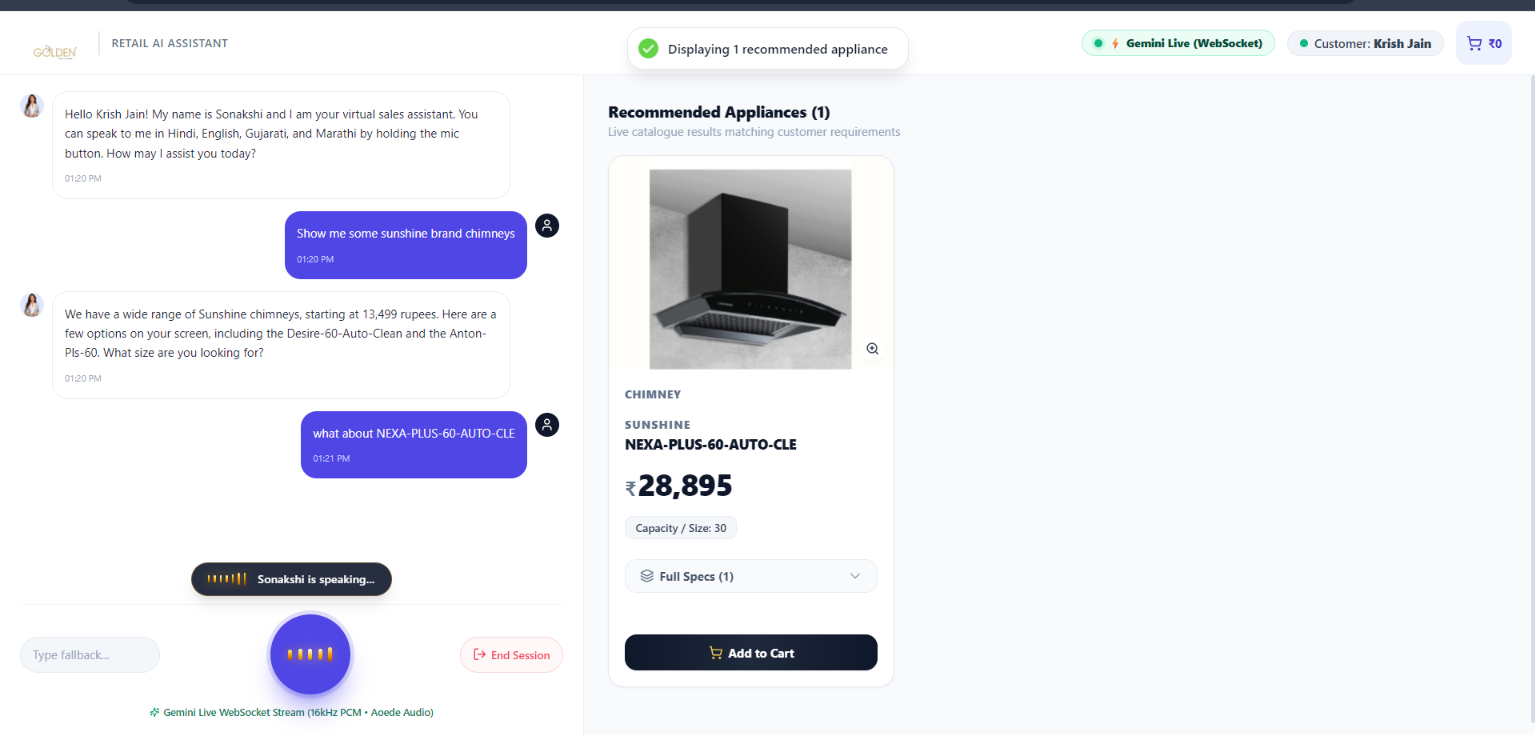
Sonakshi voice conversation on the left and a recommended appliance card with price and Add to Cart on the right.
Sonakshi on the showroom tablet: voice chat with live product cards.
Stage 1 of 6

Understand the business

Where walk-ins wait.

Showroom staff cannot be at every aisle, and customers speak many languages. A shop floor is loud, so an always-listening microphone would not work.

  • Customers wait for staff to answer product questions.
  • Specs and prices sit in catalogues and spreadsheets.
  • Interest rarely reaches billing as a complete list.
Stage 2 of 6

Identify latent revenue

Every walk-in, captured.

The value sat in unanswered questions.

  • Every walk-in can get an answer, in their language.
  • Customer details and consent captured at session start.
  • Shoppers' selections reach billing as a complete cart.
Stage 3 of 6

Design adaptive systems

Grounded, never guessing.

Press-to-talk voice.

Customers ask in their language, and the agent listens only on press.

Catalogue-grounded answers.

Specs come from the store's PDFs and prices from its Excel sheet.

Product cards.

Images, key specs, MRP and store price appear beside the voice answer.

Temporary cart.

Customers add items by touch or voice during the session.

QR to billing.

Counter staff scan the cart and bill in the existing POS.

Admin uploads.

Managers add catalogues, price sheets and images without a developer.

Built with
MongoDBExpressReactNode.jsSarvam AI voiceGemini File SearchWebSocket live updates
Sonakshi admin dashboard showing catalogue metrics, active products and ingestion controls.
Catalogue overview and ingestion controls in the admin dashboard.
A shopper asks, and product cards appear beside the answer.
Stage 4 of 6

Pilot with on-ground teams

Tested on the shop floor.

Watch a shopper ask, see products and leave with a QR cart.

Demo video coming soon Sonakshi recorded walkthrough
Stage 5 of 6

Refine and deploy

Your store, your angle.

Your catalogues, price sheet, languages and store branding. Billing stays in your existing POS.

Stage 6 of 6

Enable and monitor

Always on. Always improving.

Shoppers get answers, billing gets carts.

  • Customers ask questions without waiting for staff.
  • Name, number and consent are captured at session start.
  • The counter receives a complete cart as a QR code.

Excel master price list

Upload pricing, model numbers, categories, and custom specs (.xlsx, .xls)

PDF product brochures

Extract deep specifications, dimensions, features, and energy ratings via Gemini (up to 100 MB, .pdf)

Catalogue page screenshots

Drag-and-drop, browse, or press Ctrl+V to paste full-page screenshots (PNG, JPEG, WebP, max 20)

Upload a brand catalogue PDF from the admin panel.
CONNECT

Every problem has an angle. Let's find yours.

Low-code, high-code or sovereign AI: our engineers are ready to build it with you.

OFFICE LOCATION
ThePlayce, 17th Floor, Marathon Millennium, Lal Bahadur Shastri Marg, beside Nirmal Lifestyle Road, Moti Nagar, Mulund Colony, Mulund West, Mumbai, Maharashtra 400080
Open in Google Maps
FOUNDER DIRECT CHANNELS
Subramaniam (Subu) Iyer Founder
Abhishek Bagwe Co-founder